Grok AI
- 4.8
- Rating
- 100.00M
- Installs
- Free
- Price
 Analysis by App-foxy
I approached Grok as a practical productivity tool rather than another chatbot to open once, ask a novelty question, and forget. Its most useful idea is the combination of conversational answers, image generation, and access to real-time information from X. That mix changes the app’s role: it can help me understand a topic, turn the result into something visual, and check what people are discussing now without making me jump between several applications.
That does not make every answer automatically reliable, and it does not replace careful research. What it does offer is a faster way to move from a vague question to a workable starting point. I found the experience most convincing when I treated it as a thinking partner: I gave it context, asked for a specific format, challenged unclear points, and then checked anything important before acting on it. For quick planning, brainstorming, rewriting, and current-topic exploration, that workflow feels natural on a phone.
Why Grok’s real-time angle matters
The standout capability here is the connection between an AI conversation and current activity on X. A normal productivity assistant may be good at explaining established knowledge, drafting text, or organizing ideas, but it can feel detached from what is happening today. Grok is more useful when the question depends on recent discussion, public reactions, or fast-moving developments.
You May Also Like

 AccuWeather: Weather Radar
AccuWeather Review: A Quick, Clear Forecast for Everyday Decisions
For everyday plans, the best forecast is the one you can understand quickly. AccuWeather makes rain timing, radar, and local conditions easy to act on, with a few trade-offs.

 Hill Climb Racing
Why Hill Climb Racing Still Turns Crashes Into One More Run
A tiny car, a bumpy hill and one more upgrade: Hill Climb Racing keeps resurfacing because its simple chaos makes every near-miss feel personal.

 AliExpress - Shopping App
AliExpress Makes Global Shopping Feel Personal, but Shoppers Bear the Risk
AliExpress turns a global marketplace into a pocket-sized discovery engine. Its reach is useful, its shopping loop compelling, and its trade-offs easy to miss.

 Lords Mobile: Kingdom Wars
Lords Mobile Is a Kingdom-Building Routine, Not a Quick Match
A case-by-case verdict on the building, battles, device demands, and social commitments that make Lords Mobile rewarding for some players and exhausting for others.

 PDF Scanner app - TapScanner
TapScanner Makes Paperwork Easier to Capture, Check, and Share
TapScanner makes scanning with a phone feel less like a rescue operation and more like a dependable step in getting work done. Its capture tools are useful, though not flawless.

 Block Blast!
 Shows How Much a Puzzle Game Can Leave Out
A quiet grid game shows why puzzle players increasingly value instant clarity, repeatable skill and low-pressure play—and where the genre still needs to catch up.
More From Our News Desk
View All News


In practice, I would not use that access as a guarantee of truth. Real-time conversations can be noisy, repetitive, emotional, or incomplete. The advantage is earlier awareness, not automatic verification. Grok can help me see which angles are being discussed and summarize the visible conversation, while I remain responsible for separating a useful signal from speculation.
This distinction is important because the app is categorized as Productivity, yet its value is not limited to conventional office tasks. I can use it to outline an article, compare approaches to a project, prepare questions for a meeting, or turn a developing topic into a short briefing. The real-time layer makes those tasks more responsive than a static assistant, especially when the subject is changing during the day.
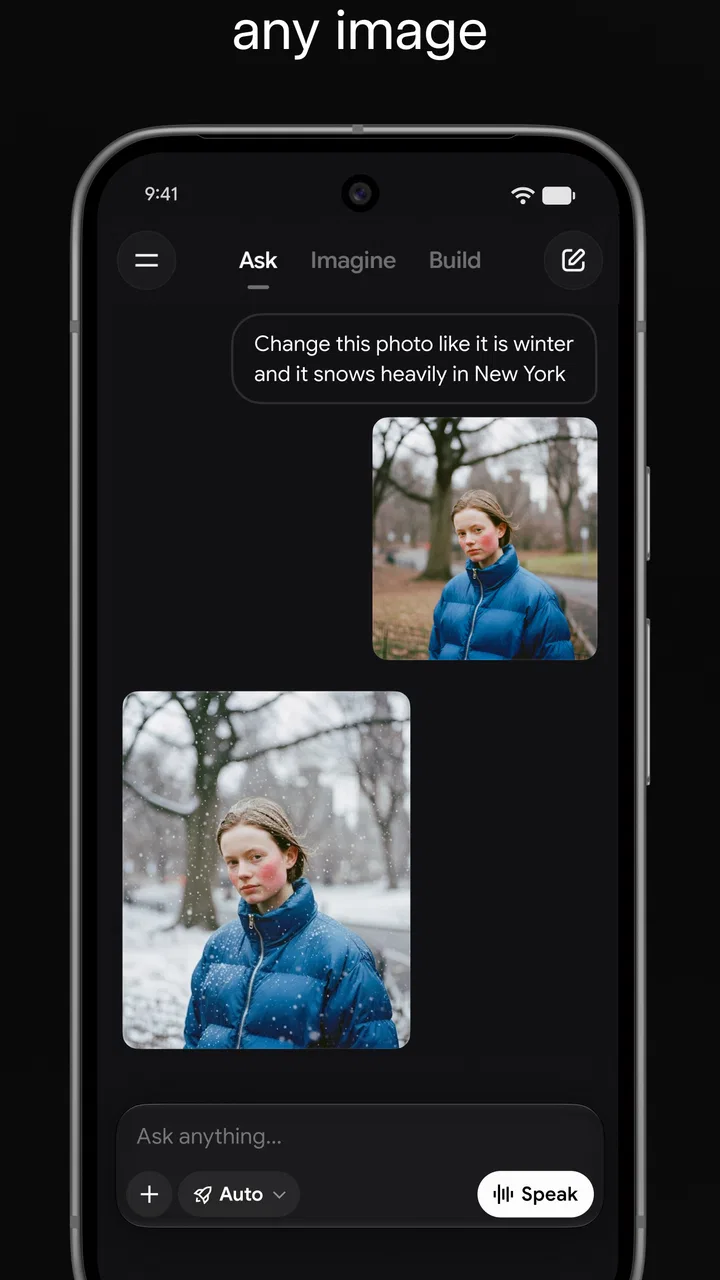
The image-generation side adds another step. Instead of stopping at written suggestions, I can ask for a visual direction after discussing an idea. That is helpful for early concepts, social posts, mood boards, presentation inspiration, or a quick illustration to make a draft easier to understand. I see it as an ideation tool rather than a replacement for a designer’s complete workflow.
The strongest benefit is the shortened distance between “What is happening?” and “What should I do next?” Grok can help with both parts in one conversation, provided I keep my requests precise and review the result instead of accepting the first response blindly.
Turning a broad question into a useful result
The quality of the exchange depends heavily on how I frame the request. A vague prompt such as “Explain this trend” may produce a broad answer. A better request identifies the audience, desired length, time frame, and decision I am trying to make. For example, I might ask for a concise summary of a current discussion, the main arguments on each side, points that appear uncertain, and three questions I should investigate next.
This is one of the less obvious ways to get more from the app: ask it to expose uncertainty instead of merely asking for confidence. I also find it helpful to request a structure before requesting polished prose. First I ask for a short outline, then I challenge the weak section, and only afterward ask for a final draft. That reduces the chance of receiving smooth writing built on a shaky premise.
For image work, the same principle applies. I get more useful results when I describe the purpose of the image, the intended audience, the mood, and the elements that must remain visible. A request for “a modern banner” is open-ended; a request describing the subject, composition, contrast, and space needed for text gives the generator a clearer target. I would still expect to refine the result rather than treating the first image as finished artwork.
A realistic everyday workflow
Imagine I am preparing a short presentation about a topic that is being actively discussed online. I can begin by asking Grok for a plain-language explanation, then ask it to identify the points that depend on recent events. Next, I can request a compact outline with separate sections for background, current discussion, and questions that need confirmation. After that, I might ask for a visual concept for the opening slide.
The useful part is not that the app completes the entire presentation without effort. The useful part is that it helps me move through several early stages without opening a search tool, a writing assistant, and an image app separately. I still need to check sources, adjust the wording to suit the audience, and make sure the visual does not imply something misleading. Grok reduces friction; it does not remove judgment.
For a smaller task, I might paste rough notes from a meeting and ask for action items grouped by person or deadline. I would then compare the response with the original notes, because an assistant can make an implied responsibility sound definite. That small verification step is worthwhile. The app is particularly good at giving messy material a readable shape, but the person who attended the meeting remains the authority on what was actually agreed.
Another practical use is decision preparation. If I am choosing between two approaches, I can ask Grok to build a comparison based on cost, effort, risk, and likely benefit, then request the strongest argument against its preferred option. That final request is valuable because it exposes the trade-off I might otherwise overlook. I would not ask the app to make a high-stakes decision for me, but I would use it to make my own thinking less one-sided.
Where the app feels better than familiar alternatives
Compared with a conventional search engine, Grok is more comfortable with follow-up questions and transformation. I can ask for a summary, then a simpler explanation, then a checklist without rebuilding the search from scratch. Search remains better when I need a broad set of primary sources, exact documents, or direct control over which pages I inspect. Grok is better at turning a question into a conversation.
Compared with a standard note-taking app, it adds interpretation. Notes can store information reliably, while Grok can reorganize, condense, or challenge the material. That convenience comes with a trade-off: notes preserve what I wrote, whereas an AI response may introduce an error or a conclusion that was not present in the original. I use the assistant for processing, not as the only archive of important facts.
Compared with a dedicated image generator, its visual tools are attractive when I am already discussing an idea in text. I do not have to explain the concept again in a separate application. A specialist image workflow may still be preferable when I need detailed control, repeatable brand consistency, or precise editing. Grok’s advantage is speed during exploration, not necessarily final production control.
That combination is also why the app can feel unusually broad. It is not simply a writing tool, a news reader, or an art utility. It sits between those categories. For someone who wants one place to ask, refine, summarize, and visualize, that breadth is convenient. For someone who prefers a focused tool with predictable boundaries, it may feel less disciplined.
The friction I noticed before recommending it
The first limitation is the same feature that makes the app interesting: current information can be messy. Activity on X reflects live conversation, not a carefully edited reference collection. A popular claim may be repeated before it is established, and a confident summary can still require checking. I would be especially cautious with medical, legal, financial, safety, or reputational questions.
The second limitation is that fluent writing can hide weak reasoning. Grok may give an answer that sounds complete even when the prompt was ambiguous. I get better results by asking it to state assumptions, distinguish facts from interpretation, and identify what would change the conclusion. This takes a little more effort than asking one question, but it makes the tool much more dependable as a productivity aid.
There is also a practical cost consideration. The app itself is free to download and use, while in-app purchases range from around thirty dollars to about three hundred dollars per item. That means I would check the available plan details carefully before assuming that every capability or level of use fits my budget. A free starting point is useful, but frequent users should understand what their intended workflow may cost rather than treating “free” as unlimited.
Content is rated Teen, which is worth keeping in mind for families and for anyone planning to use it in a classroom or shared workplace. I would not hand the app to a younger child without supervision. The broad subject range and the open-ended nature of conversation make context important, even when the interface itself is simple.
On the technical side, the current Android release is 1.0.93-release.00 and requires Android 9 or later. That is a reasonable compatibility point for many phones, but anyone using an older device should check the operating system before planning around it. I also prefer to keep the app updated, because AI services can change quickly and an older release may not reflect the current experience.
Who gets the most value from it
Grok makes the most sense for people who regularly move between research, drafting, and visual ideation. Students can use it to turn a difficult subject into an outline and generate questions for further study. Writers can use it to test angles, simplify language, and explore timely discussion. Small teams can use it to prepare meeting material or brainstorm campaign concepts before choosing a direction.
It is also a good fit for curious users who follow fast-moving conversations and want to ask follow-up questions in ordinary language. Instead of reading a long stream and trying to reconstruct the context alone, I can ask for a summary and then probe a specific claim. Again, I would treat that as orientation rather than final reporting, but it can save time when I am deciding where to look next.
People who need strict source control may prefer another setup. If my work requires every statement to be tied to a clearly identified primary document, I would use a research workflow built around those documents and perhaps use Grok only for brainstorming. Likewise, a professional designer who needs exact asset management may be better served by dedicated creative software. The app is strongest at the beginning and middle of a project, where ideas are still being shaped.
I would also skip it as a primary tool if I dislike conversational interfaces or prefer to make every search decision manually. Grok’s convenience comes from letting the assistant mediate part of the process. That is helpful for speed, but it can feel frustrating when I want complete control over the path from query to source.
My way of using it without losing control
I start with a clear task and tell Grok what a useful answer should look like. I then ask one follow-up that tests the assumptions, especially when the subject is current or controversial. For important work, I verify the central claims elsewhere and keep the original notes or source material nearby. Finally, I edit the output so it sounds like me rather than publishing an unexamined machine response.
For image generation, I treat the first result as a sketch. I refine the prompt around composition and purpose, and I check whether the image contains distracting details or visual claims I did not intend. This approach makes the feature more useful because it turns image creation into an iterative part of planning rather than a one-tap novelty.
The app has clearly attracted a large audience: it carries a 4.9 average from around 1.8 million ratings and has passed 50 million installs. Those figures suggest strong public interest, but they do not remove the need to decide whether its style suits my own habits. Popularity can tell me that the product is worth investigating; my workflow determines whether it is worth keeping.
It is developed by xAI and was released on March 24, 2025. I see that relatively recent arrival as part of the appeal and the caution. The product feels designed around a modern blend of conversation, live discussion, and visual creation, but users should expect an AI app to evolve rather than remain fixed. That can bring improvements, while also meaning that familiar behavior may change over time.
My recommendation after using it
Grok is a convincing productivity companion when I need to explore a current subject, shape an idea, and produce a first written or visual draft in one place. Its connection to real-time discussion is the capability that most clearly separates it from a basic assistant, but it is also the reason I would verify important conclusions. The app is fast and flexible; it is not a substitute for source judgment.
I would recommend trying it to anyone who wants a conversational way to research, brainstorm, summarize, and develop images, especially when the topic is changing quickly. I would not recommend relying on it alone for high-stakes decisions, rigorous source-based work, or polished professional design. Used with those boundaries, the free entry point makes it easy to see whether the workflow fits.
My final view is positive but measured. Grok works best as a fast first partner, not as the last authority. If I use its live perspective to discover questions, its writing ability to organize thoughts, and its image tools to explore possibilities, it earns a useful place in my productivity routine. If I expect every answer to be final, perfectly sourced, or ready to publish without review, I am likely to be disappointed.
FAQs for Grok AI
01What is Grok • Smartest AI Advisor used for?
Grok • Smartest AI Advisor is designed to provide personalized advice and insights across various topics, helping users make informed decisions. Whether it's financial guidance, career advice, or lifestyle tips, Grok uses advanced AI algorithms to tailor recommendations based on user preferences and data analysis.
02How does Grok ensure user data privacy?
Grok prioritizes user data privacy by implementing robust encryption protocols and following strict data protection regulations. User data is stored securely and is only accessed to enhance the app’s functionality. The app also provides users with control over their data, allowing them to manage what is shared and stored.
03Is Grok available on both Android and iOS platforms?
Yes, Grok • Smartest AI Advisor is available for download on both Android and iOS platforms. Users can easily find the app on the Google Play Store and the Apple App Store, ensuring compatibility with a wide range of smartphones and tablets.
04Does Grok require an internet connection to function?
Grok generally requires an internet connection to deliver real-time advice and updates. However, some basic features might be accessible offline, depending on the app’s settings and user preferences. For optimal performance and access to the latest insights, a stable internet connection is recommended.
05Are there any subscription fees for Grok?
Grok offers a free version with basic features, but to unlock advanced functionalities and personalized insights, users may need to subscribe to a premium plan. The app provides various subscription tiers, allowing users to choose one that fits their needs and budget. Detailed pricing is available within the app.
Pros
- Intuitive interface for easy navigation.
- Provides personalized AI-driven advice.
- Offers real-time insights and updates.
- Compatible with both Android and iOS.
- Secure data handling and user privacy.
Cons
- Requires constant internet connection.
- Limited free version features.
- Occasional lag during heavy use.
- May not integrate with all apps.
- Some advice may seem generic.

Grok AI
Gallery